
The Chrome and Edge browsers have built-in APIs for language detection, translation, summarization, and more, using locally hosted models. Here’s how to take advantage of them.

With every passing year, local AI models get smaller, more efficient, and more comparable in power with their higher-end, cloud-hosted counterparts. You can run many of the same inference jobs on your own hardware, without needing an internet connection or even a particularly powerful GPU.
The hard part has been standing up the infrastructure to do it. Applications like ComfyUI and LM Studio offer ways to run models locally, but they’re big third-party apps that still require their own setup and maintenance. Wouldn’t it be great to run local AI models right in the browser?
Google Chrome and Microsoft Edge now offer that as a feature, by way of an experimental API set. With Chrome and Edge, you can perform a slew of AI-powered tasks, like summarizing a document, translating text between languages, or generating text from a prompt. All of these are accomplished with models downloaded and run locally on demand.
In this article I’ll show a simple example of Chrome and Edge’s experimental local AI APIs in action. While both browsers are in theory based on the same set of experimental APIs, they do support different varieties of functionality, and use different models. For Chrome, it’s Gemini Nano; for Edge, it’s the Phi-4-mini models.
The following demo of the Summarizer API works on both browsers, although the performance may differ between them. In my experience, Summarizer ran significantly slower on Edge.
The available AI APIs in Chrome and Edge
Chrome and Edge share a common codebase — the Chromium project — and the AI APIs available to both stem from what that project supports. As of April 2026, the available AI APIs in Chrome are:
- Translator API: Translate text from one language to another, assuming a model is available for that language pair.
- Language Detector API: Determine the language for a given input text.
- Summarizer API: Condense text into headlines, summaries, and bullet-point rundowns.
All three of these APIs are available immediately to Chrome users. All except the language detector API are also available to Edge users, although that is planned for future support.
Several other APIs, which are in a more experimental state, are available in both browsers on an opt-in basis:
- Writer API: Generate text from a given prompt.
- Rewriter API: Rewrite an existing text based on instructions from a prompt.
- Prompt API: Make natural language requests directly to the model (e.g., “Search the web for up-to-date information about visiting Italy”).
- Proofreader API: Examine a text for spelling and grammatical errors and suggest corrections.
The long-term ambition is to have these APIs accepted as general web standards, but for now they’re specific to Chrome and Edge.
Using the Summarizer API
We’ll use the Summarizer API as an example for how to use these APIs generally. The Summarizer API is available on both Chrome and Edge, and the way it’s used serves as a good model for how the other APIs also work.
First, create a web page which you’ll access through some kind of local web server. If you have Python installed, you can create an index.html file in a directory, open that directory in the terminal, and use py -m http.server to serve the contents on port 8080. You can’t, and shouldn’t, try to open the web page as a local file, as that may cause content-restriction rules to kick in and break things.
Here’s the source code of the page to create:
<div style="display: flex;">
    <textarea style="width:50%; height:24em" id="input" placeholder="Type text to be summarized"></textarea><br>
    <textarea style="width:50%; height:24em" id="output" placeholder="Summarization results"></textarea><br>
</div>
<textarea style="width:100%; height:4em" id="context" placeholder="Additional context"></textarea>
<label for="type">Type of summarization:</label>
<select id="type" name="type">
    <option value="teaser">Teaser</option>
    <option value="tldr">tl;dr</option>
    <option value="headline">Headline</option>
    <option value="key-points">Key points</option>
</select>

<label for="length">Length:</label>
<select id="length" name="length">
    <option value="short">Short</option>
    <option value="medium">Medium</option>
    <option value="long">Long</option>
</select>

<button type="button" onclick="go();">Start</button>
<div style="background-color:beige" id="log"></div>
<script>
    const $log = document.getElementById("log")
    const $input = document.getElementById("input")
    const $output = document.getElementById("output")
    const $context = document.getElementById("context")
    const $type = document.getElementById("type")
    const $length = document.getElementById("length")

    function log(text) {
        $log.innerHTML += text + "<br>";
    }
    async function summarize() {
        $log.innerHTML = "";

        if (!'Summarizer' in self) {
            log("Summarizer not available")
            return false
        };

        const availability = await Summarizer.availability();
        log(`Summarizer status: ${availability}`);

        const summarizer = await Summarizer.create({
            sharedContext: $context.value,
            type: $type.value,
            length: $length.value,
            format: 'markdown',
            monitor(m) {
                m.addEventListener('downloadprogress', (e) => {
                    log(`Downloaded ${e.loaded * 100}%`);
                });
            }
        });

        log("Summarizer created, starting summarization");

        $output.value = "";

        const stream = summarizer.summarizeStreaming($input.value)
        for await (const chunk of stream) {
            $output.value += chunk;
        }

        log("Finished.")
    }
    function go() {
        summarize();
    }
</script>
Most of what we want to pay attention to is in the summarize() function. Let’s walk through the steps.
Step 1: Verify the API is available
The line if (!'Summarizer' in self) will determine if the summarizer API is even available on the browser. The follow-up, const availability = await Summarizer.availability(); returns the status of the model required for the API:
downloadable: The model needs to be downloaded, so you’ll want to provide some kind of progress feedback for the download. (The above code has an example of how this could be implemented, via themonitor()function passed to theSummarizer.create()method.)available: The model is on the device and can be used right away.
Step 2: Create the Summarizer object
The next step is to create the Summarizer object, which can take several parameters:
sharedContext: A text which gives the summarizer additional context for how to do its work (e.g. “Format the output as a bullet list of questions”).type: One of four values that describes the format for the summary.teasertries to create interest in the text’s contents without revealing full details;tldrprovides a quick and concise summary, no more than a sentence or two;headlinegenerates a suitable headline for the text; andkey-pointsproduces a bullet list of takeaways.length: One ofshort,medium, orlong; this parameter controls how long the output should be.format: The format of the input text.markdownis the default; another allowed value isplain-text. If you are using HTML as your source, you may want to use.innerTextto derive a text-only version of the input.
Step 3: Stream and iterate over the output
Most of the time, we want to see the output streamed a token at a time, so we have some sense that the model is working. To do this, we use const stream = summarizer.summarizeStreaming($input.value) to create an object we can iterate over ($input.value is the text to summarize). We then use for await (const chunk of stream){} to iterate over each chunk and add it to the $output field.
Here’s an example of some input and output:
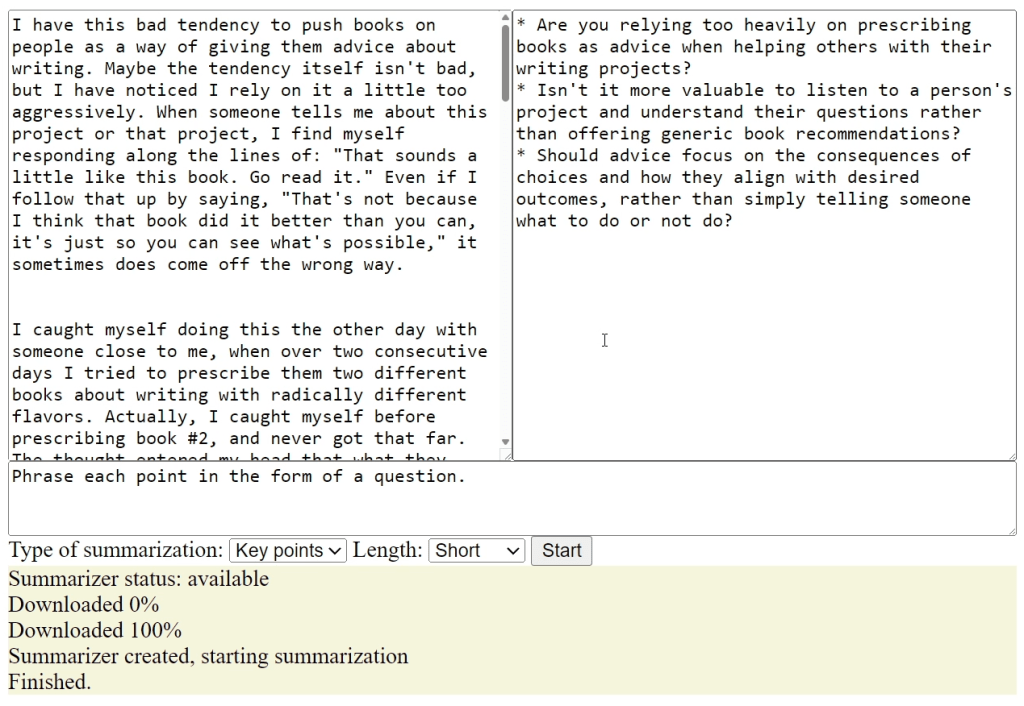
Example output for built-in text summarizer AI model in Chrome and Edge. The model runs entirely on the device hosting the browser and does not call out to an external service to deliver its results.
Foundry
Caveats for using Summarizer (and other local AI APIs)
The first thing to keep in mind is that the model will take some time to download on first use. The sizes of the models vary, but you can expect them to be in the gigabyte range. That’s why it’s a good idea to provide some kind of UI feedback for the download process. Ideally, you’d want to provide some way to run the model download process and then ping the user when it’s ready for use.
Once models are downloaded, there’s no programmatic interface to how they’re managed — at least, not yet. On Google Chrome there’s a local URL, chrome://on-device-internals/, that shows which models have been loaded and provides statistics about them. You can use this page to remove models manually or inspect their stats for the sake of debugging, but the JavaScript APIs don’t expose any such functionality.
When you start the inference process, there may be a noticeable delay between the time the summarization starts and the appearance of the first token. Right now there’s no way for the API to give us feedback about what’s happening during that time, so you’ll want to at least let the user know the process has started.
Finally, while Chrome and Edge support a small number of local AI APIs now, how the future of browser-based local AI will play out is still open-ended. For instance, we might see a more generic standard emerge for how local models work, rather than the task-specific versions shown here. But you can still get going right now.